
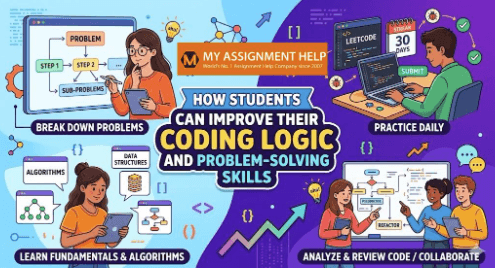
For many high school and university students, diving into computer science feels like learning a superpower. You write a few lines of code, hit execute, and suddenly a digital world springs to life. However, almost every developer hits a wall early in their journey. You understand the syntax of Python, Java, or C++, and you know what an if statement or a for loop does—but when faced with a blank text editor and a complex prompt, you freeze.
This roadblock isn’t a lack of coding talent; it is a gap in coding logic and algorithmic problem-solving.
Programming languages are merely tools, much like a hammer and chisel. Knowing how to hold them doesn’t make you a sculptor. The true art of computer science lies in computational thinking: the ability to break down a vague, massive problem into discrete, logical steps that a computer can execute. Whether you are prepping for AP Computer Science, working through a university data structures course, or aiming for software engineering internships, building your logical muscles is the single best investment you can make.
1. Deconstruct the Problem Before You Type
The biggest mistake novice programmers make is typing code too early. When handed a problem statement, the instinct is to immediately open an Integrated Development Environment (IDE) and start writing syntax. This approach almost always leads to messy, unorganized code, logical dead ends, and endless hours of frustrating debugging.
Instead, professional software engineers spend up to 70% of their time planning. Before writing a single line of code, you must completely understand the problem using a structured approach:
- Define the Inputs and Outputs: What exactly is your program receiving? Is it an array of integers, a string of text, or a database query? What exactly must it return or print?
- Identify the Constraints: What are the limits of the problem? If you are handling numbers, can they be negative? If you are processing strings, do spaces or capital letters matter? Knowing constraints prevents edge-case bugs down the line.
- Work Through a Manual Example: Pick a simple input sample and solve it entirely by hand. Write down the exact, step-by-step mental process you used to find the solution. If your brain cannot solve it manually, you cannot write a program to solve it automatically.
2. Master Pseudocode and Flowcharts
Once you have solved the problem mentally, you need to bridge the gap between human thought and machine execution. This is where pseudocode and flowcharting become indispensable tools.
Pseudocode is a detailed, informal description of what a computer program or algorithm must do, written in plain English rather than a specific programming language. Because it ignores rigid syntax rules, it frees your brain to focus entirely on pure logic. Consider this example for finding the largest number in a list:

By drafting this first, you establish a foolproof logical blueprint. If your pseudocode is sound, translating it into actual language syntax becomes a trivial task of matching code to your logical steps. If you ever find yourself stuck converting these blueprints into working scripts, seeking structured python assignment help can be an excellent way to see how abstract logic maps directly to clean, executable code.
3. The Power of Algorithmic Efficiency: A Concrete Example
To truly understand coding logic, students must transition from writing code that just works to writing code that works efficiently. This is measured using Big O notation, which describes how execution time or memory space scales with input size. Striking the balance between memory management and speed is a common hurdle—it is precisely why so many students look for external resources or think, “I need someone to do my c programming homework ” when dealing with low-level pointer mechanics and data structures.
Let’s look at a classic interview and exam problem: The Two-Sum Problem. You are given an array of numbers and a target sum. You need to find the indices of the two numbers that add up to that target.
The Naive Approach (Brute Force)
A beginner often uses a nested loop to check every single possible pair. While this works for a small list, it becomes incredibly slow as the dataset grows.
The Optimized Approach (Algorithmic Logic)
By applying better coding logic and utilizing a Hash Map (dictionary), you can solve this problem by looking at each number exactly once.
The Computational Focus Block
Why Algorithmic Logic Matters: The brute-force approach has a time complexity of $O(n^2)$, meaning if the list has 10,000 items, the computer performs roughly 100,000,000 operations. The optimized hash map approach runs in $O(n)$ linear time, reducing those operations to just 10,000. Mastering this shift in mindset is what defines university-level computational thinking.
4. Leverage Proven Academic Frameworks
Improving your coding logic doesn’t require reinventing the wheel. You can fast-track your problem-solving capabilities by integrating classic academic and psychological frameworks into your study routine.
The Feynman Technique
Named after physicist Richard Feynman, this technique states that the ultimate test of your understanding is your ability to explain a concept simply to someone else.
- How to apply it to code: When you finally solve a difficult programming challenge, don’t just close the tab. Explain the solution aloud as if you were teaching it to a complete beginner. If you stumble or have to resort to heavy technical jargon to mask a gap in your explanation, you don’t fully understand the logic yet. Go back and review that specific block of code.
Deep Work
Author Cal Newport defines “Deep Work” as distraction-free, intense concentration that pushes your cognitive capabilities to their limit. Coding logic requires building complex, multi-layered mental models.
- How to apply it to code: Turn off your phone, close your social media tabs, and dedicate solid 60-to-90-minute blocks entirely to problem-solving. Fragmented attention kills logical processing; you cannot build complex algorithmic systems in your head if you are context-switching every ten minutes to check notifications.
The Pomodoro Technique
To prevent cognitive burnout during intense deep work sessions, utilize the Pomodoro Technique—working with intense focus for 25 minutes followed by a 5-minute break. After four cycles, take a longer 15-to-30-minute break. This keeps your mind fresh and agile, drastically reducing the mental fatigue that causes careless logical errors in your code blocks.
5. Master Core Data Structures and Algorithms
You cannot build a sturdy house without knowing what materials are available. In computer science, your materials are Data Structures (how you store and organize data) and Algorithms (the step-by-step procedures used to manipulate that data).
Many student logic issues stem from trying to solve a problem with the wrong tools. As seen in our Two-Sum example, searching for an item in an unsorted array takes linear time, whereas utilizing a hash map can optimize your search down to constant time.
To elevate your coding logic, ensure you have a rock-solid understanding of these fundamental concepts:
- Arrays and Linked Lists: The foundational linear building blocks of data allocation.
- Stacks and Queues: Vital for managing data sequences (e.g., Last-In, First-Out and First-In, First-Out operations).
- Hash Tables: Essential for rapid, high-performance data retrieval via key-value pairs.
- Trees and Graphs: Crucial for managing hierarchical, relational, and networked data.
- Sorting and Searching Algorithms: Understanding binary search, quicksort, and mergesort logic trains your mind to think about computational efficiency.
For high school students looking to transition smoothly into university-level computer science, mastering these primitives early provides an immense competitive advantage.
6. Embrace the Power of Deliberate Practice
Brilliant logical thinkers are made, not born. Consistent, daily practice is the mechanism that turns complex logic into second nature. However, simply writing the same basic programs over and over will cause your progress to plateau. You must engage in deliberate practice—consistently tackling problems that sit just outside your comfort zone.
Fortunately, the digital ecosystem offers excellent platforms tailored for every skill level:
- For Beginners & High School Students: Platforms like Edabit and CodingBat offer byte-sized, isolated logical puzzles that reinforce fundamental syntax, loops, and basic string manipulation without overwhelming you.
- For Intermediate & University Students: Platforms like HackerRank and LeetCode provide structured tracks categorized by difficulty (Easy, Medium, Hard) and specific data structures.
When practicing on these platforms, don’t focus on the sheer volume of problems solved. Focus on depth. If a problem takes you two hours to solve, analyze why. Once your code passes all test cases, look at the submission forum to see how top-tier developers solved the exact same prompt. Analyzing more elegant, efficient solutions is one of the fastest ways to upgrade your own logical patterns.
7. Learn to Debug Systematically
Debugging is an essential component of the problem-solving pipeline. When your code outputs the wrong result, it means your mental model of the program deviates from what the computer is actually executing.
Many students debug via guesswork—changing a plus sign to a minus sign or shifting an index variable randomly, hoping it fixes the error. This is inefficient and counterproductive. Instead, adopt a systematic approach:
- Use a Debugger Tool: Learn how to set breakpoints in your IDE (like VS Code, IntelliJ, or PyCharm). Step through your program line by line and monitor how variable states change in real-time.
- The Rubber Duck Method: If you don’t have a debugger set up, print key variables at critical intervals. Alternatively, explain your code line by line to an inanimate object (like a rubber duck). Forcing yourself to explain what a line actually does versus what you hoped it would do often reveals the flaw instantly.
- Isolate Code Blocks: If a massive program is failing, isolate the troubled function into a separate file and test it with controlled inputs. Once the individual component works perfectly, integrate it back into the main codebase.
See also: <a></a><strong>Is Your Website Too Slow? A Small Business Guide To Fixing Core Web Vitals</strong>
8. Collaborate, Review, and Seek Academic Support
Programming can feel isolating, but nobody becomes an expert developer in a vacuum. True logical growth happens when you collaborate with others and expose your code to external critique.
Consider participating in Peer Code Reviews. Pair up with a classmate or a fellow coder and read through each other’s projects. You will be amazed at how often someone else can spot a logical loophole that you missed entirely. Engaging in hackathons, group projects, and open-source contributions also exposes you to diverse styles of software architecture and problem-solving methodologies.
However, academic workloads can occasionally become overwhelming. When balancing complex programming assignments, tight deadlines, and rigorous exam preparation, it is completely normal to run into conceptual walls that feel impossible to climb alone. In these moments, seeking structured, professional guidance can make all the difference.
If you find yourself stuck on complex algorithmic assignments, turning to vetted educational platforms and expert computer science resources can help clear up confusion. Utilizing Myassignmenthelp.com can help break down confusing algorithmic concepts into clear, digestible steps, ensuring you stay on track, master the underlying data logic and maintain your academic momentum.
Frequently Asked Questions
Q.1 What are the best coding logic problems for beginners?
Beginners should start with small, isolated logic puzzles rather than full applications. Good starting points include basic number checks (e.g., determining if a number is prime, finding a factorial using recursion), string reversals, and structural loop puzzles like printing geometric star patterns (such as Floyd’s Triangle).
Q.2 Can I learn coding logic if I am not good at math?
Yes. Programming logic is fundamentally about sequence, structure, and problem deconstruction rather than advanced calculations. While sectors like game development or machine learning require high-level mathematics, building strong day-to-day coding logic relies mostly on basic, school-level math and strong analytical thinking.
Q.3 Is it better to practice logic building in Python, Java, or C++?
For absolute beginners, Python is highly recommended because its clean, readable syntax allows you to focus purely on algorithmic logic without fighting complex formatting. However, practicing in strongly-typed languages like Java or low-level languages like C can give you a deeper, more disciplined understanding of memory allocation and strict data types.
Q.4 How long does it take to get good at coding logic?
Developing strong algorithmic logic is a continuous journey, but noticeable improvements typically happen within 2 to 3 months of consistent, daily deliberate practice (around 30 to 45 minutes a day). Focus on working thoroughly through fewer problems rather than rushing through solutions.
Final Thoughts: Consistency Over Intensity
Building elite coding logic is highly analogous to physical weight training. You cannot go to the gym for 15 hours straight in a single day and expect to wake up with peak physical fitness. Muscle growth requires consistent, daily training over an extended period.
The same rule applies to your brain. Coding for 30 to 45 minutes every single day will do infinitely more for your logical capabilities than pulling an exhausting, frantic 10-hour cram session the night before a project is due.
Be patient with yourself. When your code crashes, don’t view it as a failure—view it as a puzzle waiting to be solved. By breaking down your problems, planning with pseudocode, mastering core structures, and applying systematic frameworks, you will transform from a student who simply writes syntax into a true computational problem solver.
About the Author – Drake Miller
I am a dedicated academic blogger at Myassignmenthelp.com with experience in creating informative and student-focused content for learners across various educational stages. My work centers on assignment support, academic organization, research methods, and effective study practices. Through clear insights and practical guidance, I aim to help students improve academic outcomes, maintain motivation, and overcome educational challenges with greater confidence.