Overexposed photos are a common photography problem. Bright areas lose detail and appear washed out. The image looks too bright overall. Highlights become pure white with no texture.
Many photographers wonder if these photos can be saved. The answer depends on several factors. This guide will help you understand what’s fixable. You’ll learn the best methods to rescue your overexposed images.
In this article, you’ll discover:
- How much overexposure can actually be recovered
- The best PC software for fixing overexposed photos
- Mobile solutions for quick edits on your phone
- Professional tips for better recovery results
- When to accept a photo is beyond repair
1. How Much Overexposure Can Be Fixed?
Understanding Recoverable Highlights
Not all overexposed photos can be saved. Recoverable highlights still contain some image data. Completely blown-out areas have lost all detail. Pure white pixels cannot be restored.
Minor overexposure is usually fixable. Moderate overexposure requires more work. Severe overexposure may be impossible to fix completely.
JPEG vs RAW Photo Recovery Differences
RAW files offer much better recovery options. They store more image data than JPEGs. RAW files contain up to 14 bits of color information. JPEGs only have 8 bits.
This extra data makes a huge difference. RAW files can recover 2-3 stops of overexposure. JPEGs typically recover less than one stop. Always shoot in RAW for important photos.
How to Quickly Check if a Photo is Worth Fixing
Open your photo in any editing software. Look at the histogram display. The histogram shows brightness distribution across your image.
Check if the graph touches the right edge. A small touch means minor overexposure. A large spike means severe problems. If the entire right side is peaked, recovery will be difficult.
Zoom into the brightest areas. Look for any remaining texture or detail. If you see some variation, the photo is salvageable. Pure white areas with zero detail cannot be recovered.
2. How to Fix Overexposed Photos on PC?
Using Leawo Photo Enhancer
Leawo Photo Enhancer provides powerful tools for fixing overexposed images. This software uses advanced algorithms to recover lost details. The process is simple and effective.
Download and install the software first. Launch Leawo Photo Enhancer on your computer. Import your overexposed photo into the program.
The software offers automatic enhancement features. Click the auto-fix button for quick results. The program analyzes your image automatically. It adjusts exposure, contrast, and highlights intelligently.
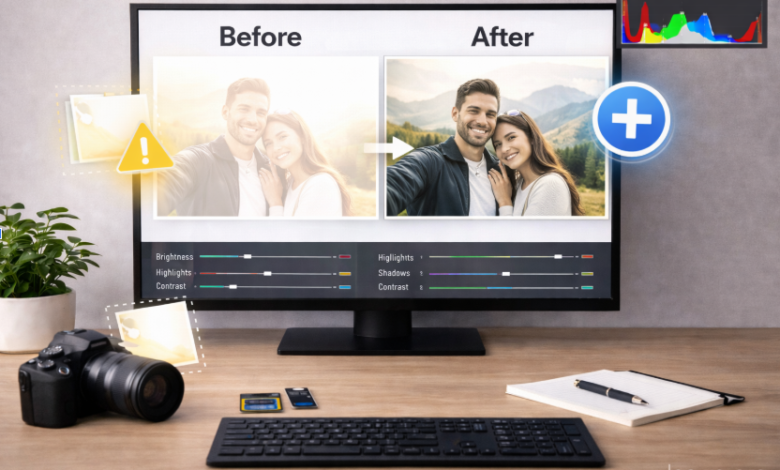
For manual control, use the adjustment sliders. Reduce the exposure slider first. Lower the highlights to recover bright areas. Increase shadows to balance the image.
The whites slider controls the brightest tones. Pull it down to restore detail. Adjust contrast for better overall depth. Fine-tune until the image looks natural.
Preview your changes in real-time. Compare the before and after versions. Save your corrected photo when satisfied.
Alternative AI Solutions
An AI photo editor can also help fix overexposed photos. AI tools analyze images intelligently. They apply corrections based on millions of sample photos.
These programs work with one click often. They’re perfect for beginners. Advanced users still have manual controls available.
3. How to Fix Overexposed Photos on Phone?
How to Fix Overexposed Photos on iPhone
iPhones have built-in editing tools. Open your overexposed image in the Photos app. Tap the Edit button at the top.
Use the Light adjustment section. Reduce the Exposure slider significantly. Pull down the Highlights slider next. This recovers bright areas effectively.
Increase Shadows slightly for balance. Adjust Brightness if needed. The Contrast slider adds depth back to flat images.
Experiment with these controls together. Small adjustments work best. Avoid extreme corrections that look unnatural.
Android Phone Solutions
Android users have many editing app options. Snapseed is free and powerful. Adobe Lightroom Mobile works excellently too.
The editing process is similar across apps. Reduce exposure first. Lower highlights second. Increase shadows for balance. These three steps fix most overexposed photos.
See also: HDFC Fintechasia Net: HDFC Fintechasia: Navigating Digital Financial Services
4. Tips to Get Better Results When Fixing Overexposed Photos
Work with RAW Files When Possible
Always shoot in RAW format if available. Transfer RAW files to your computer. Edit them with proper RAW processing software. The results will be dramatically better.
Make Small Adjustments
Avoid extreme slider movements. Small changes accumulate effectively. Too much correction creates unnatural results. Work gradually toward your goal.
Balance Your Edits
Don’t just lower exposure alone. Adjust multiple settings together. Balance highlights, shadows, and midtones. This creates more natural-looking corrections.
Check the Entire Image
Zoom in to inspect details. Check if grain or noise appeared. Overexposure fixes can introduce artifacts. Apply noise reduction if needed.
Use Selective Adjustments
Fix only the overexposed areas when possible. Leave properly exposed sections alone. Gradient filters work well for skies. Brush tools target specific problem spots.
5. Conclusion
Fixing overexposed photos is often possible. The success depends on how much detail remains. RAW files offer the best recovery chances.
Modern software makes the process accessible. Desktop programs like Leawo Photo Enhancer provide professional results. Mobile apps offer convenient on-the-go solutions.
Remember that prevention is better than correction. Check your exposure before shooting. Use your camera’s histogram as a guide. Bracket your exposures in challenging lighting.
When overexposure happens, act quickly. Assess whether the photo is salvageable. Use the right tools for your file type. Apply corrections carefully and systematically.
Not every overexposed photo can be saved. Completely blown highlights are lost forever. But with proper techniques, many photos can be rescued. Your memories don’t have to stay washed out.